
How to withdraw
Choose the coin and amount, paste your own wallet address, and press Withdraw. Most withdrawals go out automatically. Larger ones are checked by our team first.
Open your Wallet and choose Withdraw.
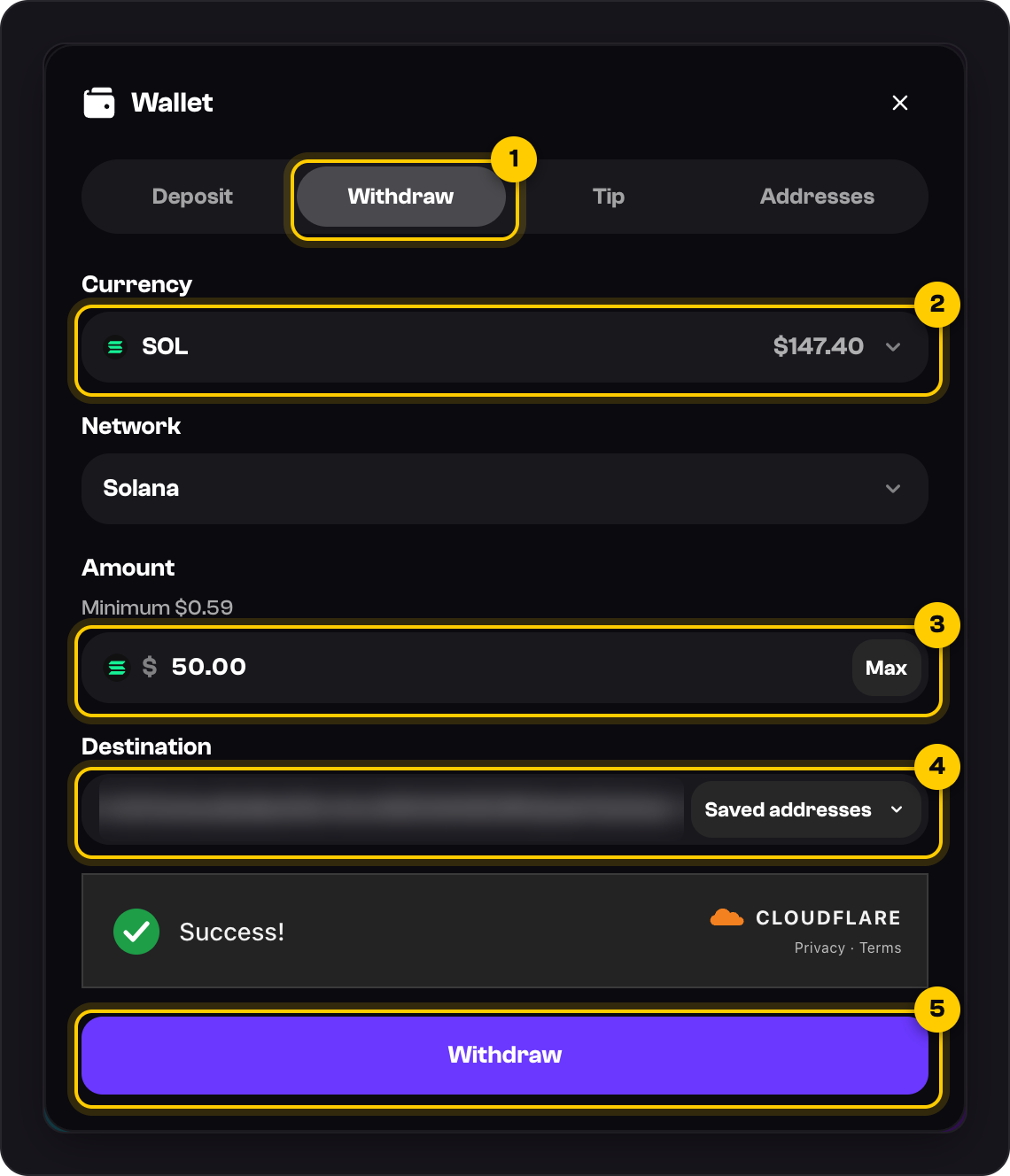
Choose the coin under Currency. You withdraw the coin you hold; we don't convert it.
Enter the Amount. The minimum is above the box, and Max fills in your whole balance.
Under Destination, paste your own Solana address or pick one from Saved addresses.
Wait for the Cloudflare check to show Success!, then press Withdraw.
You'll see Withdrawal submitted. Follow it in Settings → Transactions, and the bell tells you when it's completed.
Good to know
- No fees. You receive the full amount, and we pay the network fee.
- Check the address twice. Crypto sent to the wrong address can't be brought back.
- A withdrawal can't be cancelled once it's submitted. If it fails or is rejected, the full amount comes back to your balance.
- Larger withdrawals are reviewed first. See Why is my withdrawal under review?
Was this helpful?



Still stuck?
Message us in the chat with the coin, the amount, and the status it shows in Transactions.