
Create an account
Sign up with your email or with Google. It takes about a minute.
Press Sign up at the top right of any page, then:
Enter your Email, choose a Username, and pick a Password of at least 10 characters.
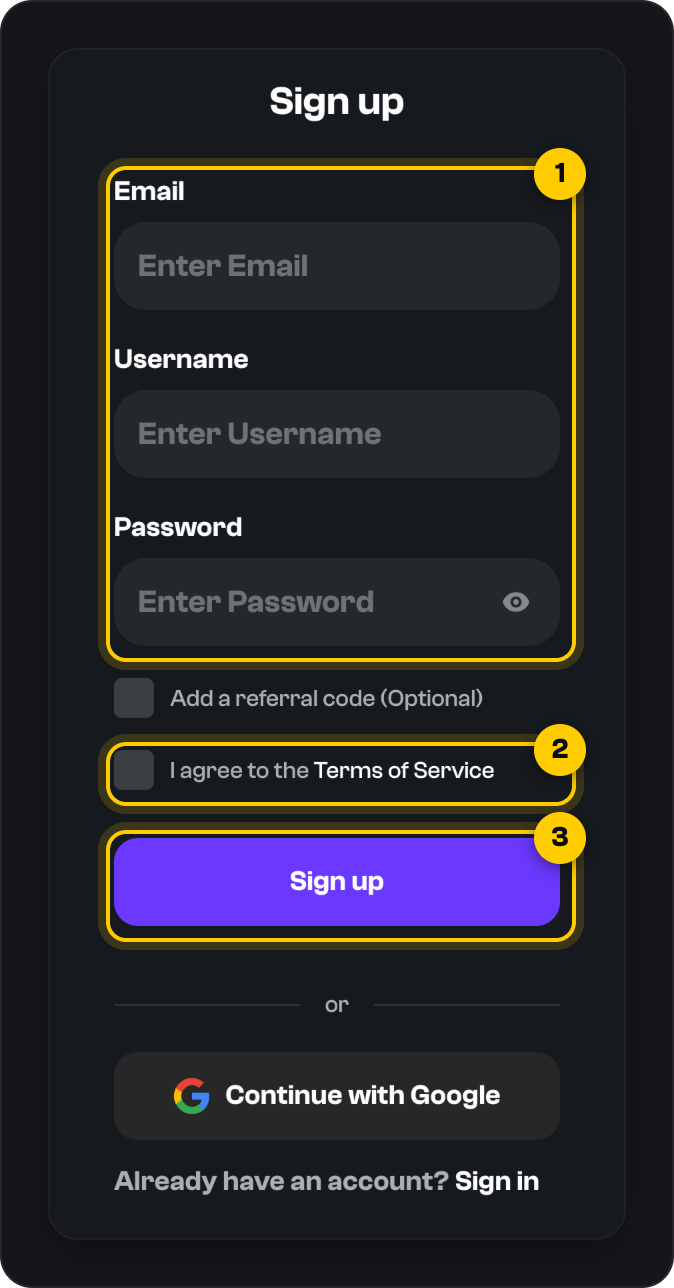
Tick I agree to the Terms of Service.
Press Sign up. We'll email you a link to verify your address.
Sign up with Google
Press Continue with Google. On Finish setting up, choose a username, tick the Terms box and press Continue.
On a phone
Tap Sign in at the bottom of the screen, then Sign up under the form.
Good to know
- Have a referral code? Tick Add a referral code (Optional) and enter it before you press Sign up.
- Usernames are 2 to 32 characters: lowercase letters, numbers and underscores. You can change yours later.
- You must be 18 or over and live where we're allowed to operate. See our Terms of Service.
- There's no automatic sign-up bonus. Offers come as promo codes.
Was this helpful?